Hi EMSA Community,
Automatic camera trap image and data processing in EMSA

We have previously mentioned the WildObs project (WildObs | The Wildlife Observatory of Australia) and the service they offer to analyse camera trap images.
DCCEEW have joined forces with WildObs and TERN to develop a system to automatically analyse camera trap images submitted through their portal and to link those images to camera trap metadata collected through Monitor. A big part of the project will be to provide an image verification system for NRM groups to confirm species IDs, and to return the occurrence data back to the NRM groups in a human readable form (Excel ready) and to TERN in a BDR (Biodiversity Data Repository) ready format.
This is a significant development for EMSA, automating and linking several currently manual processes. This new development will make EMSA faster and easier to use. The project is expected to be completed in coming months. Stay tuned for more information and training opportunities!
Monitor App update
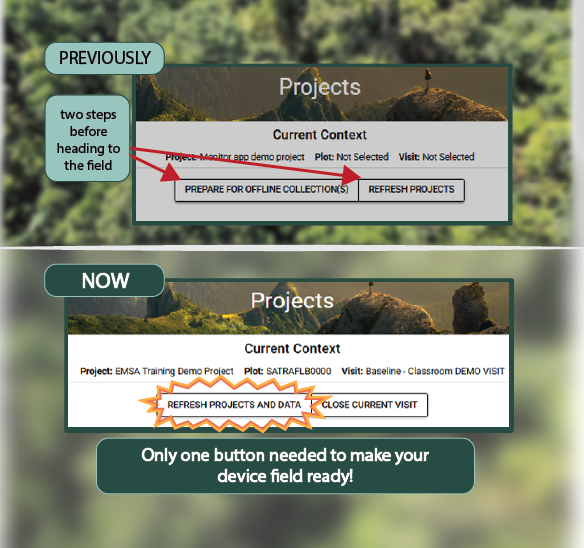
You may have noticed in the most recent Monitor app update, the ‘prepare for offline collection(s)’ and ‘refresh projects’ buttons have disappeared. The new ‘Refresh projects and data’ button does all the work of the two old buttons and pulls any updated project information and vouchers that you will need for your next surveys.
Before using the new button, always make sure that any new plot selections are completed and synced via a laptop or desktop, and check that you have a strong and stable internet connection. Once you have clicked the button please remain on the page with the device screen 'on' while the data loads in the background.
Reminders
If you haven’t already, please take a moment to update your Monitor app to Version 1.0.10. Make sure you have a stable internet connection for the update. You can view which version you are running by going to the menu on the left of the Monitor screen and looking at the bottom of the list.
Build: production
Version: 1.0.10+2
Git Hash: c20b6752
The EMSA Helpdesk is available to you. Please don’t hesitate to get in touch with all your EMSA and Monitor related questions. Megan and Ellen are more than happy to answer your questions and help troubleshoot!